

An offline AI promise fails when a user reaches a feature that their device cannot run. For on-device vs cloud AI, choose per feature: verify local support and readiness, then define what happens when inference fails, including when the cloud is unreachable. This Android readiness checklist separates those decisions and leaves test results for your team to record.
On-device AI runs inference locally; cloud AI requires a remote service. For an Android generative feature, the practical choice depends on the exact API, device and model state. A phone appearing on a support list does not establish that its model is ready. Keep the local path only where your tests support it, and allow cloud escalation only when the app's data policy and connectivity permit it.
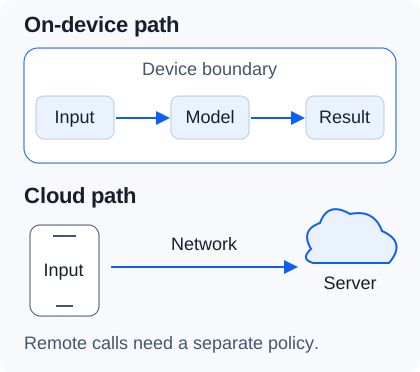
Local inference and a remote request have different data paths. This schematic shows inference only; separately review analytics, logging and other network activity in the app.
Start with the feature and its target configuration
Record the API feature before choosing an implementation. Google's ML Kit GenAI overview, checked 18 October 2026, gives different support lists for feature-specific APIs and Prompt; speech recognition has its own modes. Check the list for the feature you will ship, then check runtime availability on the actual device.
| Input or item | Record | Why it matters |
|---|---|---|
| Input or itemFeature and implementation | Record API name, SDK version, app build and model version | Why it matters A result for one feature or runtime does not validate another. |
| Input or itemTarget configuration | RecordDevice, OS, language and model/setup state | Why it matters Repeat after relevant app, model or system changes. |
| Input or itemAllowed outcomes | Record Local result, permitted cloud attempt, deferred task or manual alternative | Why it matters Decide how the feature behaves before a failure reaches the user. |
Compare implementation paths on the same checks
ML Kit manages access to a shared model; LiteRT-LM puts the model integration in your app's deployment path. Google's LiteRT overview directs generative and conversational workloads to LiteRT-LM and distinguishes them from perception models using LiteRT's CompiledModel API. A runtime's platform support alone does not validate your chosen model on a particular phone.
| Path | Model and readiness | Choose it when | Dominant failure mode & prevention |
|---|---|---|---|
| PathML Kit GenAI | Model and readiness AICore exposes the shared Gemini Nano model. Check your feature and its runtime availability. | Choose it when A supported feature meets the needs of your tested Android configuration. | Dominant failure mode & prevention Supported device, unusable feature: check model status, language and app state before enabling it. |
| PathLiteRT-LM | Model and readiness Integrate the chosen model with the runtime and validate delivery, loading and output. | Choose it when You need control over the model and can maintain its device-specific integration. | Dominant failure mode & prevention Model/runtime mismatch or load failure: test the exact artifact and backend on the target device. |
| PathExisting MediaPipe LLM Inference | Model and readiness Google marks it maintenance-only and recommends migrating to LiteRT-LM. | Choose it when You are maintaining an existing integration while planning and testing migration. | Dominant failure mode & prevention Assuming new features will arrive here: evaluate the migration path and rerun the same tests. |
| PathYour cloud endpoint | Model and readiness Your team selects and operates the remote model/service. No particular provider is assumed here. | Choose it when Remote processing is permitted and the connected service meets the feature requirements. | Dominant failure mode & prevention Network or service failure: test authentication, timeout and unavailable-service behavior; retain a usable exit. |
The MediaPipe migration notice concerns that API's maintenance status. It does not invalidate an existing app's measured results or prove that a replacement will pass them.
Separate model availability from offline readiness
For Prompt, call checkStatus() before showing an available feature. Google's Prompt setup guide distinguishes UNAVAILABLE, DOWNLOADABLE, DOWNLOADING and AVAILABLE. A downloadable model still needs provisioning; a downloading model needs a later status check. Even AVAILABLE only clears the model-readiness check: inference can still fail.
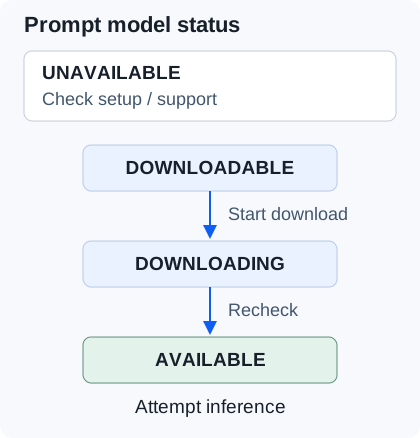
Prompt model states separate provisioning from execution. UNAVAILABLE can also mean the device has not fetched its latest configuration, so investigate setup before treating the hardware as permanently unsupported.
Use the status method documented for your chosen API; do not copy Prompt method names into another feature without checking its reference. The same guide describes setup failures after a device or AICore reset. Test a prepared device offline and first-run behavior separately. If initial provisioning requires a connection, state that requirement in the product experience.
For ML Kit, record getBaseModelName() alongside the test: Google warns that the same prompt can produce different output across Nano versions. Define acceptable output for your task and language before comparing local and cloud results. A device-support entry cannot establish that quality bar.
Run the readiness checklist on the devices you support
Copy this table into your test record, one copy per feature and configuration. Leave each result/evidence cell blank until you run it; record the date, observation and log reference when you do. A test fixture may simulate an error for routing coverage, but label it as simulated rather than evidence that you reached a production quota.
| Test | Action and evidence to capture | Your result / evidence |
|---|---|---|
| TestExact feature support | Action and evidence to capture Check the current feature list and runtime status on the target configuration. Save the source date and returned state. | Your result / evidence |
| TestModel and output | Action and evidence to capture Record the model version; run fixed task inputs in each required language. Compare against your acceptance criteria. | Your result / evidence |
| TestFresh setup, connected | Action and evidence to capture Test first launch and model provisioning on an appropriate fresh test device. Record download failure and recovery behavior. | Your result / evidence |
| TestFresh setup, offline | Action and evidence to capture Disconnect before first use. Record what the app tells the user if the model/configuration is absent. | Your result / evidence |
| TestPrepared device, offline | Action and evidence to capture Provision first, then disable connectivity and run the complete task. Check any required assets or backend steps too. | Your result / evidence |
| TestApp leaves the foreground | Action and evidence to capture Start or trigger the feature with the app off-screen, including a foreground service. Record the response and recovery after return. | Your result / evidence |
| TestBusy and long quota | Action and evidence to capture Exercise the error handlers separately, using controlled fixtures where necessary. Record retry, cancellation and user-facing outcomes. | Your result / evidence |
| TestChosen local backend | Action and evidence to capture For an app-managed model, test loading and inference on the backend and device you intend to ship; record any fallback actually observed. | Your result / evidence |
| TestPermitted cloud attempt | Action and evidence to capture Force a local failure while connected. Verify the request policy, destination, user notice and accepted output. | Your result / evidence |
| TestCloud also unavailable | Action and evidence to capture Repeat with no network and with a failing endpoint. Confirm no hidden upload, lost input or endless retry loop. | Your result / evidence |
For ML Kit, the overview requires the app to be the top foreground application; a foreground service does not satisfy that condition. Keep that restriction specific to ML Kit. This page does not establish background-execution behavior for your LiteRT-LM integration.
Route failures without breaking the offline promise
Cloud fallback is a separate network operation, not an offline recovery mechanism. Before attempting it, check whether remote processing is allowed for that request and whether the service can be reached. Define a deferred, manual or unavailable state for the remaining cases, and handle a failed cloud attempt too.
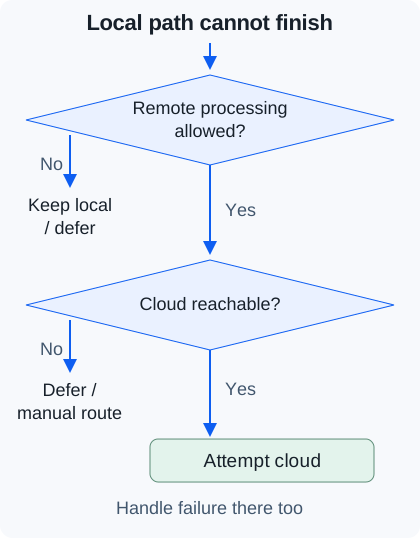
Proposed application routing, not behavior supplied automatically by the SDK. A reachable cloud service can still reject or fail a request.
| Observed condition | Immediate handling | Fallback decision |
|---|---|---|
| Observed conditionNot ready or unavailable | Immediate handling Inspect status and setup; show download, wait or unavailable state as appropriate. | Fallback decision Use cloud only if permitted and connected. Keep a local alternative for offline use. |
Observed conditionBACKGROUND_USE_BLOCKED | Immediate handling Return to the foreground or defer the task. | Fallback decision A remote implementation needs its own app-lifecycle handling; switching endpoints is not an exemption. |
Observed conditionBUSY | Immediate handling Check app state as well as request volume. Use exponential backoff where retry is appropriate, with your own cancellation and wait budget. | Fallback decision After that budget, offer the allowed alternative. Do not classify every BUSY as permanent lack of support. |
Observed conditionPER_APP_BATTERY_USE_QUOTA_EXCEEDED | Immediate handling Stop a tight retry loop and explain temporary local unavailability. | Fallback decision Choose a permitted cloud attempt or defer. The cited docs give no universal reset time. |
| Observed conditionPolicy rejection or cancelled work | Immediate handling Respect the rejection or cancellation. | Fallback decision Do not route to another model merely to evade a safety restriction or revive a cancelled task. |
The ML Kit error reference says BUSY can reflect quota exhaustion or disallowed background use. It describes the battery-use error as a long-duration quota. Those distinctions determine which recovery branch to test; they do not supply a fixed retry count.
Count readiness across the fleet, then budget the work
Use request-weighted coverage to size the remaining service path. Count requests that pass all local checks together; multiplying unrelated fleet-wide percentages can misrepresent which devices are actually ready.
Local-ready share = requests passing every local gate / all feature requests
For an assumed planning example, start with 1,000 feature requests: 600 come from supported configurations; of those, 450 have the model ready; of those, 360 also meet app-state and output requirements. The local-ready share is 360 / 1,000 = 36%, leaving 1,000 - 360 = 640 requests needing another outcome. These are hypothetical inputs, not device measurements, API limits or a forecast of cloud traffic. Some remaining requests may need deferral rather than a remote call.
Compare the engineering work as well as service usage: model distribution and updates, device regression testing, download recovery, local diagnostics, cloud operation and maintaining both error paths. Record actual effort and usage for your app before estimating savings. This checklist supplies no universal latency target, financial break-even point or privacy/compliance verdict.
Check the source record or report a mismatch
Use the official links below when a device or API changes. For summit context, read our record of the Google I/O on-device GenAI session, then explore related edge AI talks. Session arguments and current API requirements serve different purposes; the checklist's technical claims come from the documentation.
If your result contradicts a row, report a correction with the article URL, source link/date, API feature, device/OS, app/SDK and model versions, app state, network state and exact error. Exclude private prompts and credentials. These details let editors locate the disputed condition under our methodology.
Method and sources
Compiled from current Google documentation retrieved 18 October 2026. The blank worksheet records reader-run validation; the routing diagrams are application-design recommendations. No device benchmark dataset accompanies this article. Recheck feature-specific references when implementing or updating an app.
- ML Kit GenAI overview, last updated 16 October 2026: model access, feature/device scope, Nano versions, foreground restrictions and quota categories.
- Prompt API setup, last updated 8 September 2026: availability states, download flow and setup failures. Method names here apply to Prompt.
- ML Kit GenAI error reference: error semantics and distinctions used in the recovery table.
- LiteRT overview: separates the perception runtime workflow from LiteRT-LM guidance for generative models.
- MediaPipe LLM Inference guide: maintenance status and migration direction.
Updated 18 October 2026. This revision separates provisioning from offline execution and makes remote fallback conditional on data policy and connectivity.